More than you posted. More than you agreed to. And more than deleting an account removes.
The common model is that your online presence is what you put there — the profiles, the posts, the purchases. That model is wrong in two ways. First, a substantial record was assembled about you by systems you never interacted with. Second, the technical details your browser sends on every page load can be used to identify you precisely, without cookies, without login, and without any action on your part.
This piece covers three layers. The first is the standard inventory. The second is what your browser transmits before you read a single word on a page. The third is how an analyst chains those signals from a population of millions down to one person.
What the internet knows: the standard inventory
The following categories are recoverable about any adult with a normal consumer and professional life in a Western jurisdiction.
Identity and contact data. Name, email addresses, phone numbers, and home addresses held across data broker databases, people-search platforms, and breach corpora. Most people have entries on Spokeo, BeenVerified, Whitepages, and Intelius without having registered with any of them. The data was sourced from public records, directory listings, and records purchased from other brokers.
Physical movements. Precise GPS coordinates tied to an advertising identifier, collected by apps that embedded location SDKs and sold the data onward. The Federal Trade Commission took enforcement action against X-Mode/Outlogic in April 2024 and Mobilewalla in January 2025 for exactly this practice. The data sold to downstream buyers before those orders is not retrieved by them.
Browsing and purchase history. Tracked by cookies, pixels, and device identifiers across the sites you visit. Ad networks aggregate this into a behavioural profile covering interests, purchase intent, inferred income, political affiliation, and health concerns.
Device metrics. IP address, operating system, browser version, and screen configuration — transmitted automatically on every request. These are the inputs to the fingerprinting process described in the next section.
Breach records. Credentials, personal details, and sometimes financial data exposed in breaches and circulating in stealer-log and combolist markets. Have I Been Pwned indexes a fraction of the active corpus; the rest trades in channels with no public lookup.
What your browser broadcasts before you do anything
Every browser transmits a fingerprint on every page load. This happens before you scroll, click, or type anything. It uses no storage. It cannot be cleared. Blocking cookies does not affect it.
A browser fingerprint is a composite of technical attributes the browser exposes as standard: user-agent string (browser name, version, engine, operating system); screen geometry (resolution, device pixel ratio, colour depth); hardware (CPU core count, declared device memory); rendering engine output (GPU vendor, GPU model via the WebGL API, canvas fingerprint); and environment (timezone, system language, installed fonts, active plugins).
Each attribute alone is weak. Together they often produce a combination that matches one device on the planet.
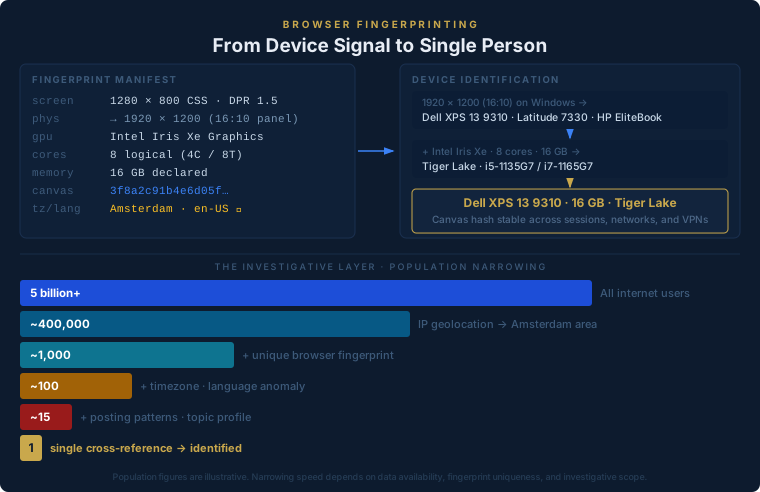
A worked example. Take a fingerprint with the following readings.
Screen: 1280×800 CSS pixels, device pixel ratio 1.5. Multiply back: the physical panel is 1920×1200. That is a 16:10 aspect ratio. The majority of consumer laptops ship with 16:9 panels (1920×1080 or 2560×1440). A 1920×1200 panel in a Windows machine manufactured between 2020 and 2023 appears in a small number of product lines: the Dell XPS 13 9310, the Dell Latitude 7330, and a handful of business-tier machines from HP and Lenovo. Already a short list.
WebGL renderer: Intel Iris Xe Graphics. Intel Iris Xe is the integrated GPU for Intel 11th-generation Tiger Lake mobile processors. Combined with the 1920×1200 screen geometry, the Dell XPS 13 9310 — released late 2020 — becomes the strongest candidate. It shipped with an i5-1135G7 or i7-1165G7 processor, both four-core with hyperthreading.
Hardware concurrency: 8. Device memory: 16 GB. Four cores with hyperthreading reports eight logical threads. The XPS 13 9310 was sold in 8 GB and 16 GB configurations; 16 GB is the higher-spec build.
At this point the fingerprint describes, with reasonable confidence, a Dell XPS 13 9310 in the 16 GB configuration running Windows at 150% display scaling. One laptop model, one spec tier.
The canvas fingerprint locks the identification further. When a browser renders a hidden image using the GPU, sub-pixel rendering produces fractionally different results depending on the GPU hardware, driver version, and system font stack. The hash of that rendered image — the canvas fingerprint — is stable across sessions and networks. The same hash appearing twice means the same physical machine visited twice, regardless of whether the IP address changed between visits.
EFF research into browser fingerprinting found that approximately 83 percent of browser fingerprints are globally unique. For a device with a distinctive hardware configuration, that figure is effectively 100 percent.
Mobile phones are a partial exception. Apple deliberately restricts Safari’s fingerprint surface on iOS: limited font measurement, restricted canvas access, capped hardware detail. The combination of screen resolution, pixel density, and hardware concurrency still narrows to a specific iPhone model generation in most cases. What breaks mobile anonymity more often is a single location event — one GPS coordinate shared with one location-aware site — placing a device at a specific building at a specific time.
If you want to know what your browser fingerprint, combined with your public record and breach data, reveals about you specifically — that is what a Mirror investigation maps.
See what’s exposedHow this chains to a single person
A fingerprint identifies a device. It does not, on its own, identify a person. The investigative step is correlation — joining sparse signals across sources to a single identity. The narrowing works through a sequence of filters.
IP address. A residential IP from an Amsterdam ISP might cover a subnet of several hundred addresses, with DHCP rotation across time. Alone, an IP places you in a city, not a building. This is noisy: a city-level match applies to hundreds of thousands of people.
Add the browser fingerprint. If the fingerprint is globally unique — as it is for 83 percent of browsers — the IP now narrows from a subnet of hundreds to one specific device. One machine, one approximate neighbourhood, one timestamp.
Add timezone and system language. A machine in the Europe/Amsterdam timezone running en-US language is statistically unusual. Most Dutch users run nl-NL. An en-US configuration in Amsterdam suggests a non-native resident, an expatriate professional, or someone who installs software in English by preference. The candidate population narrows sharply.
Add posting and activity patterns. The same fingerprint appearing in forum posts establishes a routine: posting times confirm the timezone, topics constrain occupation and interests, platforms constrain demographic. Each filter reduces the matching set further.
The result: starting from five billion internet users, IP geolocation narrows to perhaps 400,000 in greater Amsterdam. Browser fingerprint within that city: under a thousand devices with that exact configuration. Timezone plus language anomaly: a few hundred candidates. Behavioural and topic profile: dozens. A single cross-reference — a username consistent across two platforms, an email visible in one post, a professional profile with the right employer — resolves the remainder to one person.
No individual step is surveillance. Collecting a browser fingerprint is legal. An IP address is a network necessity. Behavioural patterns are inferred from public posts. The junction of all of them, in a structured investigation with the right tooling, identifies someone who believed they were anonymous.
What you can do
The practical options are real but limited.
Check your fingerprint. The EFF’s Cover Your Tracks tool tests whether your browser is unique. Most standard Chrome or Safari configurations return a unique fingerprint.
Use a privacy browser for sensitive sessions. Firefox with resistFingerprinting enabled, or the Tor Browser, reduce the fingerprint surface by joining a larger anonymity set. These do not eliminate fingerprinting but make individual attribution harder.
Separate sensitive activity. If you are researching a sensitive matter, use a separate browser profile or a clean virtual machine — not the same browser you use for everything else. The fingerprint is the link between sessions; breaking it requires a different hardware configuration.
Understand what a VPN does and does not do. A VPN masks your IP address. It does not affect your browser fingerprint, canvas hash, timezone, or system language. A person running a VPN with their standard browser is anonymous at the IP level and identifiable at every other level.
Where a self-audit ends
A self-audit tells you what your fingerprint looks like and what your IP address resolves to. It does not tell you where your fingerprint has already been logged, what profiles in data broker and breach corpora are associated with your identity, or how the cross-correlation above scores against you specifically.
For the structural data layers — the contact graphs assembled by apps you never used, insurance and financial registers, archive snapshots of deleted pages, and what AI assistants log when you use them — the companion piece on what traces you leave online covers each in depth. What those registers are then used to decide, from credit to insurance to housing, is a separate question.
The Mirror is a fixed-price investigation that maps the full cross-correlation: broker dossiers, breach-corpus records, public-record and relational-register coverage, and username linkage across handles you considered separate. The methodology is described in our walkthrough of how a Mirror investigation runs.
Sources
- EFF Cover Your Tracks — browser fingerprinting research and test tool
- FTC: Order against X-Mode/Outlogic (April 2024)
- FTC: Order against Mobilewalla (January 2025)
- Intel ARK: Core i5-1135G7 specifications
- Dell XPS 13 9310 technical specifications