On 15 January 2026, Google stopped scanning for new dark web breaches. By 16 February, the Dark Web Report was gone entirely. Google’s explanation: the tool did not provide helpful next steps. Users received alerts — your email was found in a breach — but no context on what was taken, who had it, or what to do about it.
Google was not wrong about the problem. An alert without interpretation is noise. But the solution was not to stop looking. It was to look differently. The broader context of how credential leaks reach corporate environments is covered in our Credential Leaks & Breach Response hub.
The gap Google left is not unique to Google. It exists in every free dark web monitoring tool on the market — and the gap is wider than most organisations realise.
The Stealer Log Problem
Most corporate credential leaks do not begin with a server breach. They begin with an employee’s infected device.
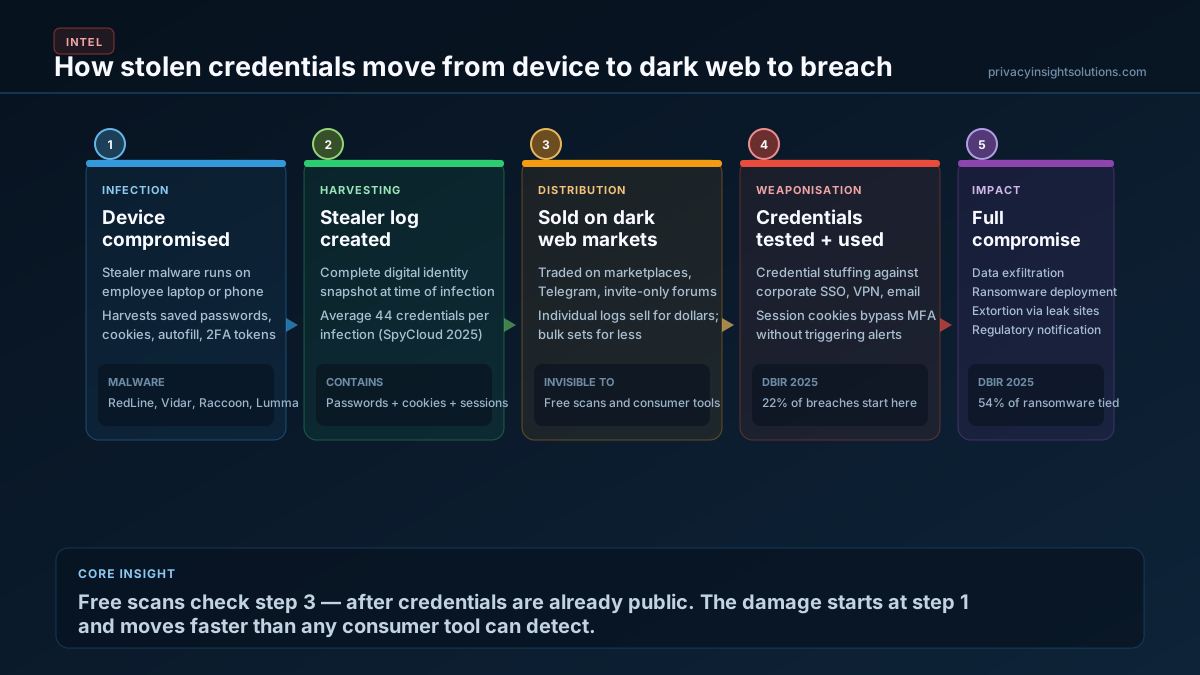
Infostealer malware — families like RedLine, Vidar, Raccoon, and Lumma — runs silently on a compromised laptop or phone. It harvests everything the browser stores: saved passwords, session cookies, autofill data, two-factor authentication tokens, and browsing history. One infection produces what the underground calls a “log” — a complete snapshot of a person’s digital identity at the moment of compromise.
The 2025 Verizon Data Breach Investigations Report found that 54% of ransomware victims had corporate credentials previously exposed in infostealer logs. In 40% of those cases, the logs contained corporate email addresses. Stolen credentials remained the most common initial access vector across all breach types, ahead of exploited vulnerabilities.
These logs do not stay with the attacker who deployed the malware. They are sold — on dark web marketplaces, in private Telegram channels, and through invite-only forums. The pricing reflects the scale: individual logs sell for dollars, bulk credential sets for less. SpyCloud’s 2025 research recaptured 53.3 billion distinct identity records circulating in these channels, with an average of 44 exposed credentials per infostealer infection.
The infrastructure supporting this trade is industrial. Stealer malware is sold as a commercial product, complete with licensing, customer support, product reviews, and escrow services. Prices start under ten dollars. The barrier to entry for a new threat actor is a cryptocurrency wallet and a Tor browser.
What Free Scans Actually Check
Consumer dark web monitoring tools — Experian, Norton LifeLock, credit bureau scans, and until recently Google’s Dark Web Report — work by checking an email address against databases of known, publicly disclosed breaches. The underlying data source is functionally equivalent to Have I Been Pwned: a curated index of breaches that have already been made public.
This is useful. HIBP alone indexes over 14 billion accounts across more than 800 confirmed breaches. If your email appeared in a known breach, these tools will tell you.
But the gap between what these tools check and what is actually circulating is significant.
They do not access stealer log marketplaces. Infostealer logs circulate through private channels days or weeks before they appear in indexed breach databases — if they ever do. By the time a consumer scanner detects the exposure, the credentials may have already been used.
They do not monitor Telegram channels. Threat actors distribute sample logs for free to build credibility, then operate private channels — access typically costs $200–500 per month — with fresher, more targeted data. Consumer monitoring tools have no visibility here.
They do not index closed forums. Many of the forums where corporate credentials are actively traded are invitation-only or require vetting. Automated consumer scanning does not reach them.
They do not capture session cookies. A stealer log contains not just passwords but active session cookies that can bypass multi-factor authentication entirely. No consumer tool monitors for this.
They provide no interpretation. A consumer scan returns a binary result: found or not found. It does not identify which specific credentials were taken, what systems those credentials access, whether corporate SSO or VPN accounts are in scope, or whether the data is already being actively traded.
What a Professional Assessment Covers
The difference between a consumer alert and a professional credential leak assessment is the difference between “your email appeared in a breach” and a complete picture of what was taken, where it is now, and what access it enables.
A professional assessment checks sources that consumer tools cannot access. It maps exposed credentials to the systems they protect — email, VPN, cloud platforms, internal applications. It identifies whether session cookies or authentication tokens are in circulation. It correlates findings across multiple data sources to determine whether the exposure is historical or active.
Critically, it answers the question that Google admitted its tool could not: what do you do about it?
Under GDPR Articles 33 and 34, organisations that discover a credential compromise affecting personal data must assess the risk and, where the threshold is met, notify their supervisory authority within 72 hours. That assessment requires knowing what was exposed and what access it enables — not just that an email address appeared in a list.
Triage Framework for Exposed Credentials
When corporate credentials surface in a leak or stealer log, the response follows a sequence:
1. Scope. Identify which credentials are exposed and which systems they access. A marketing platform login is a different risk than a domain admin credential.
2. Validity. Determine whether the credentials are current. Check when the exposure occurred, whether passwords have been changed since, and whether session cookies are still active.
3. Lateral exposure. Check for password reuse across systems. The DBIR found that only 49% of passwords were distinct across services in the median infostealer infection — meaning half the credentials unlocked multiple accounts.
4. Containment. Force password resets on affected accounts. Revoke active sessions. Where session cookies are compromised, a password reset alone is insufficient — tokens must be invalidated at the identity provider level.
5. Monitoring. Determine whether the credentials have already been used for unauthorised access. Review authentication logs for anomalous logins, particularly from unfamiliar IP ranges or geographies.
6. Regulatory assessment. Evaluate whether the exposure meets the notification threshold under applicable frameworks — GDPR Article 33, NIS2 incident reporting requirements, or sector-specific obligations.
This is not a one-time exercise. Credential exposure is ongoing, and the sources where stolen data circulates change continuously.
If this kind of exposure affects your organisation, a Corporate Audit maps the full surface — from stealer logs and dark web markets to credential reuse across your corporate systems.